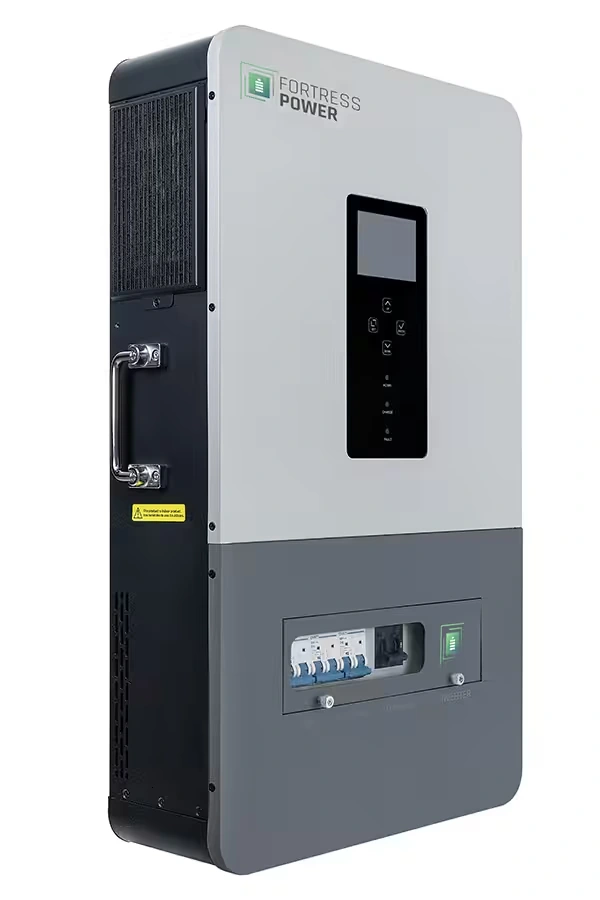
One reason I like the Fortress Power Solo 6.5K is that the customer relationship doesn’t have to end when the inverter is mounted and the system is producing power. The Solo 6.5K uses the third-party SOLARMAN platform for monitoring, commissioning, and remote access. Set up properly, that gives you and your installer a better way to understand what the system is doing after the first sunny day.
That matters here in Hawaii. A system at a home, workshop, or remote property may be operating normally even when production changes because of clouds, battery state of charge, or the loads running at that moment. A useful monitoring screen can help us look at the whole system before we start guessing.
What the Solo 6.5K can show you
The Solo 6.5K is a 6,500-watt inverter with 120/240-volt single- or split-phase output, a 48-volt battery connection, and two maximum power point tracking (MPPT) solar inputs. SOLARMAN can give you visibility into system performance, battery status, solar production, energy flow, and historical data.
Here’s a simple example. You check the app in the afternoon and see less solar power than yesterday. That number alone doesn’t tell us there’s a fault. We also want to look at battery state of charge, household load, weather, photovoltaic input, and any inverter warning. If the battery is already near its charging limit or the home is using more power, the lower solar number may be perfectly normal.
The app is most useful when it gives us context rather than one isolated number.
Give the right people the right access
Fortress Power identifies SOLARMAN as a third-party platform, separate from its own homeowner and installer applications. The homeowner uses the SOLARMAN Smart app or web portal. The installer uses SOLARMAN Business for commissioning, configuration, monitoring, and remote service.
I recommend setting up the account and access plan before we need help. Fortress Power’s instructions explain that you can authorize your installer to monitor performance, assist with troubleshooting, and complete firmware updates when needed. You can also authorize Fortress Power technical support if that level of assistance becomes useful.
That does not mean giving everyone unlimited control without discussion. We should agree on who can view the system, who can change settings, and who should be contacted before a configuration change is made. Monitoring access is valuable, but system settings still need to match the battery, solar array, loads, and operating goal.
The app supports commissioning; it doesn’t replace it
Fortress Power supports commissioning the Solo 6.5K through SOLARMAN Business or through the inverter’s local liquid-crystal display (LCD). The installation manual still governs the actual equipment, connection, safety, and startup requirements. Electrical connections and final system checks belong with the qualified installer and electrician handling the project.
The Solo 6.5K arrives with a pre-loaded configuration that includes a lithium-ion battery setting, Fortress Power communication, a 20% low-voltage cutoff, a 100% high-voltage cutoff, and self-consumption operating mode. Those are starting settings, not a reason to skip battery-specific review. For example, Fortress Power notes that its eVault MAX, eFlex MAX, and eBoost batteries use a 16-cell configuration, while the eForce battery uses a 15-cell configuration.
The Solo 6.5K also lists Controller Area Network (CAN) and RS-485 communication interfaces. That is why the battery model, communication path, and selected profile need to agree during commissioning. A communication cable by itself does not make an unmatched battery profile correct.
Why this is useful after the handoff
When a customer calls about a system concern, a monitoring history can make the conversation more specific. We may be able to see whether the issue began with solar input, battery charge level, an AC source, a load change, or an inverter warning. That doesn’t diagnose every problem remotely, and the local display remains important, but it can save time and help us decide what deserves an on-site visit.
If you want a short technical companion, Kvaser’s Physical layer properties lesson explains how CAN devices share messages across a two-wire network. It isn’t a Solo 6.5K setup lesson, but it makes one commissioning point easier to understand: the equipment, communication method, and settings all have to agree before we expect useful battery information.
I see the Solo 6.5K as a good fit when you want capable 120/240-volt power and a system that remains understandable after installation. If you’re considering one for a Hawaii home, cabin, workshop, or backup system, contact SolarMan and let’s match the inverter, battery, solar array, and monitoring plan before you order equipment.